ViralOps Studio for Learning
Turn your notes into a narrated lesson
For the day a lesson or policy changes. Describe the lesson or paste your notes. Studio writes the script, narrates it and delivers an animated film in landscape and portrait, with a title, description, chapters and thumbnails ready to post.
For teachers, trainers, course creators and anyone who has to explain a process to other people.
What you can make
How-to tutorial
Show the steps to a result, with the one mistake to avoid.
About 90 seconds
Example brief: Show new home bakers how to shape a basic sandwich loaf after the first rise. Cover four steps: pressing the air out of the dough, folding it into thirds, rolling it up tightly, and tucking the seam underneath. Point out the one common mistake of leaving the seam on top, and end by showing what a well-shaped loaf looks like before it rests again.
Start a how-to tutorial in StudioMicro-lesson
One concept in about 75 seconds, built to be remembered.
About 75 seconds
Example brief: Explain what a sunk cost is for first-year business students, in about 75 seconds. Use one made-up example: a cafe owner who has already paid for a custom neon sign and keeps funding a failing second location because of it. Then show the better question to ask, which is what a choice will cost and return from today onward. End with a one-line rule to remember.
Start a micro-lesson in StudioCourse lesson
A full lesson of up to 5 minutes. Longer topics work best split into parts.
About 3 minutes
Example brief: Teach the water cycle to middle-school students as one course lesson of about three minutes. Walk through evaporation, condensation, precipitation and collection in order, with a simple everyday picture for each, such as puddles drying in the sun and a cold glass collecting droplets. Open with a question about where rain comes from, and close by answering it and previewing the next lesson on weather.
Start a course lesson in StudioEmployee or customer onboarding
Welcome someone new and walk them through what to do first.
About 90 seconds
Example brief: Welcome new front-desk staff at a fictional dental clinic called Larch Street Dental. Walk through their first week: the morning opening checklist, how to greet and check in patients, where the appointment book lives, and who to ask when they are unsure. Keep the tone warm and calm, and finish with the three things to do on the first day before anything else.
Start an employee or customer onboarding in StudioProcess or policy walkthrough
Explain how a process or policy works, step by step.
About 90 seconds
Example brief: Walk the staff of a fictional design studio, Northfield Studio, through the expense claim process in five steps: keep the receipt, photograph it, fill in the claim form, choose the project code, and submit before the 25th so it is paid at the end of the month. Note that claims without a receipt are returned, and tell staff to email the finance team with any question.
Start a process or policy walkthrough in StudioExam or concept recap
Review the key points of a unit so they are easy to revise.
About 60 seconds
Example brief: Recap the four key ideas from a school unit on fractions for students revising before a test: what the numerator and denominator mean, equivalent fractions, adding fractions with the same denominator, and comparing fractions. Give each one a one-sentence definition and one picture, such as a pizza cut into slices. Close with a quick question that lets students test their memory.
Start an exam or concept recap in Studio
The example briefs are for made-up businesses, lessons and subjects. Lengths are typical, and you choose your own.
How it works
Step 1
Write a brief
Describe what you want, or paste your notes. Pick a video type and a length, or let Studio decide.
Step 2
Get a narrated film in two formats
Studio writes the script, narrates it and animates it, in landscape and portrait from one edit. The two layouts are re-laid out rather than cropped, with drawings timed to the narration.
Step 3
Post it with the kit
Each film comes with a title, description, chapters and thumbnails, ready to copy.
What Studio does today, and what it does not
What it does
- Narrated animated films from a brief or your own material
- Landscape and portrait from one edit, re-laid out rather than cropped
- Captions burned into the picture
- An original score
- A title, description, chapters and thumbnail options for posting
What it does not do
- No live-action footage
- No on-camera presenters
- No screen recording
- Films are up to 5 minutes today
Plans
Every pack runs on the same Studio plans. The one-day trial costs US$5 and includes one 10-second film. The US$5 is credited to your first month if you continue.
Creator
US$79 / month
Pro
US$199 / month
Business
US$499 / month
Animation styles
2 animation styles and paper films, with more styles being added.
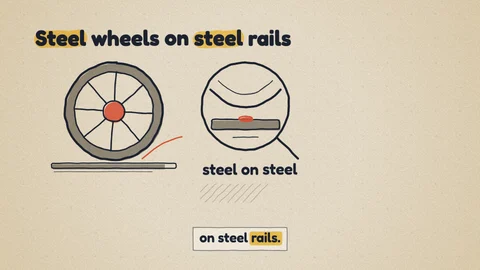
Hand-drawn
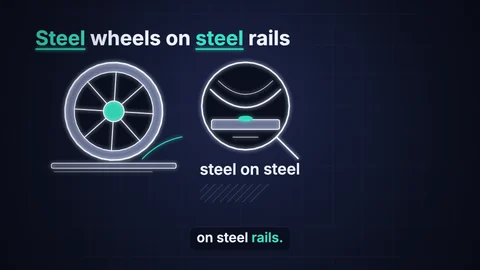
Dark keynote
Paper film
A 15-second vertical clip of a handmade paper scene that builds itself, with sound. The scene and the clip are generated with AI. Included each month: 1 on Creator, 2 on Pro, 5 on Business. Not part of the trial. A paper film is not a narrated film, and it is not a style you can choose for narrated films.
Frequently asked questions
- What kinds of lessons can I make?
- Step-by-step tutorials, short explainers on one concept, course lessons, onboarding and training films, process and policy walkthroughs, and revision recaps. You describe the lesson or paste your notes, and Studio writes, narrates and animates it.
- How long can a lesson be?
- A film can be up to 5 minutes today. A longer course works best as a series of short lessons, one film for each part.
- Will it show a presenter or record my screen?
- No. Studio makes narrated animated films. It does not use live-action footage, an on-camera presenter or a screen recording.
- Where do the facts come from?
- From the brief or notes you give it. Check the finished film for accuracy before you teach with it.
- What do I get at the end?
- The film in landscape and portrait from one edit, with captions and an original score, plus a title, description, chapters and thumbnails for posting.
- Is the narration a real person?
- No. Narration is AI-generated, and the posting copy says so. Check every fact, name and claim in a film before you publish it.
- Can I try it before I subscribe?
- Yes. The one-day trial costs US$5 and includes one 10-second film. The US$5 is credited to your first month if you continue. A card is required.